


Vigil
Student Team Project
Overview
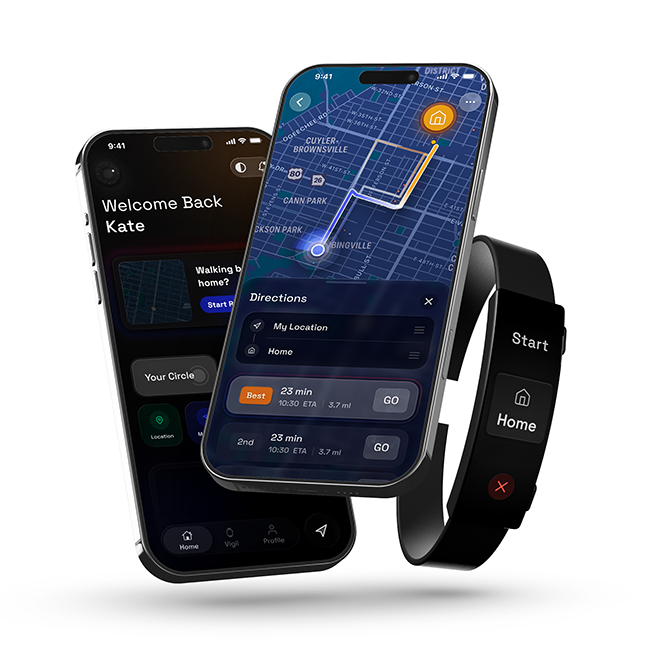
Personal safety for new corporate hires is often left to chance. Arriving in an unfamiliar city creates a "vulnerability gap" where residents lack the local intuition to navigate safely, while existing tools remain reactive by design. Vigil addresses the real issue: The lack of proactive guidance in an unpredictable environment. By connecting a discreet, easy-to-use navigation band to a live safety model, users can now follow not only the fastest route home, but the safest.
My Role
People walking home alone in a new enviroment often feel unsafe
Current solutions either demand too much attention from the user making you an easy target for crime.
Key problems identified:
- Existing safety apps require users to actively look at their phone, making them more distracted
- Emergency contact systems are often too slow or complicated to activate under stress
- No seamless way to share live location without broadcasting it publicly
- Users feel more anxious when fumbling with their phone in potentially unsafe situations
- Current apps drain battery quickly due to poor background optimization
Understanding safety behaviors, anxiety triggers, and technology habits through research
I conducted interviews with frequent late-night commuters and analyzed existing safety tools to identify where they fall short.
User Research
I conducted in-depth interviews with college students and young professionals who regularly walk home alone. A consistent theme emerged: people want a safety net that doesn't draw attention to itself or require constant interaction.
Competitive Analysis
I analyzed existing personal safety apps including bSafe, Noonlight, and Life360. While each had strengths, none offered a truly hands-free experience that could operate quietly in the background without constant user input.
User Testing Findings
Prototype testing revealed that voice-activation and ambient awareness features dramatically reduced perceived anxiety. Users felt safer knowing Vigil was running quietly in the background, ready to act without needing to unlock their phone.

A hands-free safety companion that monitors your journey home and alerts trusted contacts if something goes wrong
Vigil runs quietly in the background, using voice commands and automatic check-ins to keep users safe without demanding their attention.
Hands-Free Activation
Users can start a safety session with a single voice command or a quick widget tap. Once active, Vigil monitors the journey using GPS, checking in automatically at set intervals without requiring any screen interaction.
Smart Alerts & Trusted Contacts
If a check-in is missed or the user doesn't respond to a quiet haptic prompt, Vigil automatically notifies a pre-selected trusted contact with the user's live location — no manual SOS required.
Key Features
Vigil combines voice activation, passive GPS monitoring, automatic check-ins, discreet haptic alerts, and trusted contact notifications into one seamless experience — designed to be invisible until it's needed most.